


AVer CORE500: Room Kit for Microsoft Teams Rooms
Model
:
CORE500
Buying guides for this product
- Best Video Bar by Room Size
- All-in-One Video Conferencing Display vs TV and Video Bar
- Microsoft Teams Rooms on Windows vs Android

Genuine Products

Original Brand Warranty

Product Training

Installation, Maintenance & Support


AVer CORE500 at a Glance
- Brand
- AVer
- Model
- CORE500
- Category
- Video Conferencing Systems
- Solution
- Video Conferencing
- Supply
- Dubai, Abu Dhabi and across the UAE
- Pricing
- Quoted per project
Applications & Use Cases
AVer CORE500 Overview
The AVer CORE500 Room Kit is a complete Microsoft Teams Rooms solution that combines the AI-ready UC500 Mini PC and TC500 Touch Console into a single, easy-to-deploy system. Designed for hybrid work environments, the CORE500 helps create more equitable meetings by delivering a consistent Microsoft Teams Rooms experience across meeting spaces. Supplied by Trianze Tech to customers in Dubai, Abu Dhabi and across the UAE and GCC.
Key Features:
- UC500 Mini PC: The AI-Ready Compute Engine: No more freezing or lag in the middle of enterprise meetings.
- TC500 Touch Console: The Intuitive Command Center: Replaces meeting-room guesswork with a completely user-experience focused design.
- Single-Brand Ecosystem: AVer offers IT teams and system integrators a single point of contact and guaranteed compatibility across its entire ecosystem.
- Scalable and Future-Proof: Get years of value from your technology investment.
- Intel vPro-Ready for Enterprise-Scale Management: Empowers IT to provision, monitor, and troubleshoot devices remotely via Intel vPro, including out-of-band access before the OS even boots.
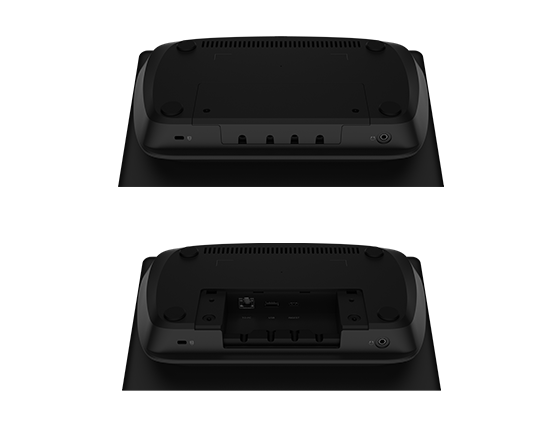
- Single-Cable Installation: Connect the UC500 to the TC500 with a single RJ-45 cable that carries both high-speed data and PoE+.
Technical Specifications:
| Spec | Value |
|---|---|
| Brand | AVer |
| Model | CORE500 |
| Type | Mini-PC |
| CPU | Intel Core Ultra 5 125H Processor (TDP 28W) |
| GPU | Intel Arc Graphics |
| Memory | 16 GB LPDDR5x (Dual-Channel, On-board) |
| Storage | 256 GB M.2 2280 PCIe 4.0 x4 NVMe SSD |
| Operating System | Windows 11 IoT Enterprise (x64) or (64-bit) |
| Pre-Installed Application | Microsoft Teams Rooms |
| Button | Power |
| LED Indicator | Blue: Power On |
| Power Supply Mode | DC Adapter, DC In |
| Power Requirement (UC500 Mini PC) | 19V/6.32A |
| Dimensions (W x H x D) (UC500 Mini PC) | 21.2 x 5.0 x 23.0 cm |
| Package Dimensions (W x H x D) (UC500 Mini PC) | 26.4 x 13.2 x 33.9 cm |
| Net Weight (UC500 Mini PC) | 1.25 (+/- 0.1) kg |
| Gross Weight (UC500 Mini PC) | 3.74 (+/- 0.1) kg |
| Security | Kensington Lock |
| Operating Conditions (UC500 Mini PC) | Temperature: 0 C to 40 C; Humidity: 10% to 90% RH Non-Condensing |
| Storage Conditions (UC500 Mini PC) | Temperature: -20 C to 60 C; Humidity: 10% to 90% RH Non-Condensing |
| Operating Altitude | Up to 5,000 m (16,400 ft) |
| Wireless Standard | Wi-Fi 6E (802.11ax), Bluetooth 5.3 |
| Data Rate | Up to 2.4 Gbps |
| USB (UC500 Mini PC) | 5 x USB 3.2 Gen 1 Type-A |
| HDMI Out | 3 x HDMI 2.2 Out (4K@60Hz, CEC Supported) |
| HDMI In | 1 x HDMI In (4K@60Hz, Content Sharing) |
| Ethernet | 2 x RJ-45 (10/100/1000 Mbps) |
| Console Port | 1 x RJ-45 Console (PoE+ Output for TC500) |
| Size | 11.6 inches |
| Resolution | Full HD (1920 x 1080) |
| Frequency Refresh Rate | 54 Hz |
| NTSC | 70% |
| Back Light Unit | ELED |
| Brightness with Glass | 300 cd/m2 (Typical) |
| Touch Technology | Projected Capacitive (PCAP) Touch |
| Multi-Touch Capacity | 10-Point Touch |
| Surface Treatment | Anti-Fingerprint, Anti-Glare |
| Motion Sensor | PIR Motion Sensor (24/7 Proximity Detection) |
| Power Requirement (TC500 Touch Console) | 1 (IEEE 802.3at Class 4, 52V 0.49A) |
| Power Consumption | 20W (Max.) |
| Dimensions (W x H x D) (TC500 Touch Console) | 27.8 x 8.5 x 16.4 cm |
| Package Dimensions (W x H x D) (TC500 Touch Console) | 26.3 x 16.3 x 34.0 cm |
| Net Weight (TC500 Touch Console) | 1.16 (+/- 0.1) kg |
| Gross Weight (TC500 Touch Console) | 2.43 (+/- 0.1) kg |
| Operating Conditions (TC500 Touch Console) | Temperature: 0 C to 40 C; Humidity: 10% to 90% RH Non-Condensing |
| Storage Conditions (TC500 Touch Console) | Temperature: -20 C to 60 C; Humidity: 10% to 90% RH Non-Condensing |
| USB (TC500 Touch Console) | 1 x USB Type-C (Content Sharing); 1 x USB 2.0 Type-A (For USB Audio Devices) |
| RJ-45 | 1 x RJ-45 (For UC500 Mini PC) |
| Audio Out | 1 x 3.5 mm Line out |
| Items | UC500 Mini PC, TC500 Touch Console, Power Adapter, Power Cord, HDMI Cable (x 2), USB Type-C Cable, CAT 6 Ethernet Cable, VESA Mount Bracket, Quick Start Guide |
Why Buy the AVer CORE500 from Trianze Tech?
- Genuine AVer product sourced through authorized channels, with local UAE support
- Pre-sales help choosing the right AVer video conferencing system for your room or classroom
- Fast delivery across Dubai, Abu Dhabi, the wider UAE and the GCC
- Installation and integration support from the Trianze Tech AV team
What's Included and Support
Frequently asked
AVer CORE500: Frequently Asked Questions
If you don't see your question here, our consultants will gladly walk you through specifics on a discovery call.
Still have questions?
Talk to a consultant. Most queries are answered in a 15-minute call.
The AVer CORE500 is a Room Kit for Microsoft Teams Rooms from AVer. Key specs: USB (UC500 Mini PC): 5 x USB 3.2 Gen 1 Type-A; Audio Out: 1 x 3.5 mm Line out; HDMI Out: 3 x HDMI 2.2 Out (4K@60Hz, CEC Supported).
Camera details of the AVer CORE500: Resolution: Full HD (1920 x 1080).
Audio on the AVer CORE500: Audio Out: 1 x 3.5 mm Line out.
Connections on the AVer CORE500: USB (UC500 Mini PC): 5 x USB 3.2 Gen 1 Type-A; HDMI Out: 3 x HDMI 2.2 Out (4K@60Hz, CEC Supported); Console Port: 1 x RJ-45 Console (PoE+ Output for TC500).
Power, size and mounting of the AVer CORE500: Power Supply Mode: DC Adapter, DC In; Dimensions (W x H x D) (UC500 Mini PC): 21.2 x 5.0 x 23.0 cm; Net Weight (UC500 Mini PC): 1.25 (+/- 0.1) kg.
Trianze Tech stocks the AVer CORE500 in Dubai with fast delivery across the UAE and GCC. Call +971 58 161 3661 or message us on WhatsApp for the best price and current stock availability.
Buying guides for this product
Plain language guides from our AV team to help you choose, plan and install.
Buying guide
Logitech Rally Bar vs Traditional Room Kits: Is an All-in-One Video Bar Enough?
Read the guide →
Buying guide
Microsoft Teams Rooms vs Zoom Rooms: What UAE Offices Should Know Before Choosing
Read the guide →

Buying guide
Designing a Microsoft Teams Signature Room: Geometry, Lighting, and Layout
Read the guide →
More from AVer
View all 72 products →-

AVer MD330UI: 4K Medical Grade PTZ Camera with 30X Optical Zoom and HDMI, IP and USB Outputs
-

AVer MD330U: 4K Medical Grade PTZ Camera with 30X Optical Zoom and HDMI, IP and USB Outputs
-

AVer MD120UI: 4K Medical Grade PTZ Camera with 20X Optical Zoom and HDMI, IP and USB Outputs
-

AVer C30u+: Charging & Sync Cart with 30 Devices


