


AVer CAM520 Pro3: Professional USB 3.1 Conferencing Camera for Mid-to-Large Rooms
Model
:
CAM520 Pro3
Buying guides for this product
- Best Video Bar by Room Size
- All-in-One Video Conferencing Display vs TV and Video Bar
- Microsoft Teams Rooms on Windows vs Android

Genuine Products

Original Brand Warranty

Product Training

Installation, Maintenance & Support


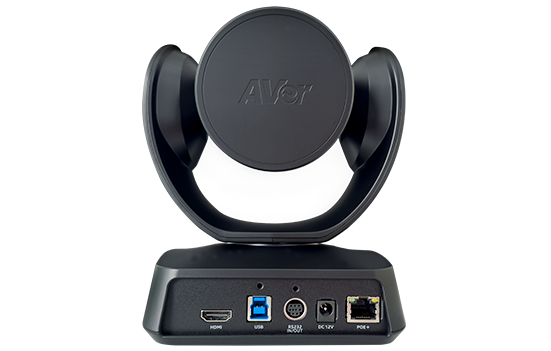
AVer CAM520 Pro3 at a Glance
- Brand
- AVer
- Model
- CAM520 Pro3
- Category
- Video Conferencing Cameras
- Solution
- Video Conferencing
- Supply
- Dubai, Abu Dhabi and across the UAE
- Pricing
- Quoted per project
Applications & Use Cases
AVer CAM520 Pro3 Overview
The AVer CAM520 Pro3 is extremely versatile, offering users a 36X total zoom PTZ camera, upgraded AVer SmartFrame, Preset Framing, and a Sony WDR Sensor. In addition, 3-way outputs, including an HDMI connection, deliver more streaming options. Supplied by Trianze Tech to customers in Dubai, Abu Dhabi and across the UAE and GCC.
Key Features:
- Master the Details with a 36X* Total Zoom Lens and Boost Your Business: Create error-free meetings with the CAM520 Pro3 PTZ lens.
- Accurately Capture Attendees with AVer Smart Composition to Access Layout Flexibility: The CAM520 Pro3 is one of the first PTZ cameras in the video conferencing industry to include a Smart Composition function.
- More Efficiency and Security with Upgraded AVer SmartFrame: With enhanced SmartFrame, AVer's CAM520 Pro3 elevates your meeting efficiency and safety.
- Flexible Video Output for Multi-Purpose Meeting Applications: The CAM520 Pro3 enables simultaneous connection and output through HDMI, USB, and IP ports, delivering three concurrent high-quality 1080p 60fps video streams, making it incredibly adaptable for a wide range of applications.
- Enjoy Enterprise-Grade Imaging with No Limits: The CAM520 Pro3 provides lifelike meetings even in in high-contrast backlight environments, such as meeting rooms with too much sunlight pouring in.
Technical Specifications:
| Spec | Value |
|---|---|
| Brand | AVer |
| Model | CAM520 Pro3 |
| Image Sensor | 1/2.8 inch 4K Sony Exmor CMOS |
| Resolution | (16:9) 1920 x 1080, 1280 x720 at 60, 30, 15fps; 1600 x 900, 960 x 540, 848 x 480, 800 x 448, 640 x 360, 424 x240, 320 x 180 at 30, 15fps; (4:3) 1280 x 960, 800 x 600, 640 x 480, 480 x 360, 320 x 240 at 30,15fps |
| Camera | SmartFrame for automatic FOV adjustment to fit all participants; Smart Composition function offers great visibility for individual participant in the meeting room; Lens F#: 1.6 (wide) ~ 2.8 (tele); Standard tripod screw holes and Kensington slot |
| Innovative Preset Framing | Follow presenter based on preset areas |
| WDR | Superb backlight compensation technology for optimizing light balance in high-contrast conditions |
| Zoom | 36X* total zoom (12X optical zoom) |
| Field of view(D/H/V) | 80.5 degrees/72.8 degrees/44.1 degrees |
| Lens focal length | 3.9 mm (wide) ~ 46.8 mm (tele) |
| Mirror, flip, AE, white balance | auto/manual override via Room Management (PTZApp 2) |
| Minimum focus distance | 1m |
| People-counting API | enterprises and third-party software providers can obtain people-counting data for better understanding of meeting-space usage |
| Pan | +/-170 degrees |
| Tilt | +90 degrees (up) -30 degrees (down) |
| Motorized Pan & Tilt Movement | 10 camera presets (via remote control); Fast and quiet pan & tilt movement |
| Video Format | YUV, YUY2, MJPEG |
| Network video compression format | H.264 |
| Network protocol | RTSP, RTMP |
| Control | IR remote control; VISCA/pelco P/pelco D via RS232 (128 preset points via VISCA command); UVC plug and play; Room Management (PTZApp 2) |
| Remote side | VISCA over IP, IP (RJ45) |
| WebUI | Browser IP access via Chrome (Does not support Internet Explorer) |
| Connectivity | 12V/2A power adaptor; Type Non-B Mini DIN 9 for RS232 in & out connection (VISCA, control panel and camera daisy chain); USB 3.1 type-B; IP (RJ45); HDMI 1.4 |
| USB | 3.1 Gen 1 Type-B, backward compatible with USB 2.0; UVC 1.1 (USB video) |
| Mount | Camera wall-mount bracket included; Optional foldable TV mount; Optional ceiling mount |
| System Requirements | Windows 7/10/11; Mac OS X 10.14 or later; Google Chromebox 3 version 94.0.4606.114 or later |
| PC Hardware Requirement | 3.2 GHz Intel Core i5-4460 processor; 8 GB RAM or more; USB 3.1 port, backward compatible with USB2.0 port |
| Operation temperature | 0 ~ 40 C |
| Operation humidity | 20% ~ 80% |
| Storage temperature | -20 ~ 60 C |
| Storage humidity | 20% ~ 80% |
| Package dimensions | 256 x 256 x 274 mm |
| Package weight | 3.335 kg/7.35 lbs |
| Camera (Dimensions) | 182 x 142.7 x 153 mm/1.47 kg |
| Remote control | 200 x 50 x 21 mm/0.09 kg |
| Optional Accessories | Mini DIN8 to D-SUB9 RS232 adapter; USB3.1 fiber extender 10m/20m/30m; USB3.1, 3m type-B to type-A cable; HDMI Cable; Ceiling mount; 1-Port POE+ Injector; Foldable TV mount |
| Chrome | version 76.x or above |
| Firefox | version 69 or above |
| IE | Not support |
| Power Supply | AC 100V ~ 240V, 50/60 Hz |
| Consumption | 12V, 2A |
| PoE+ | 802.3at |
| Room Management (PTZApp 2) | Supports Windows 7 or later, macOS 11.6 or later |
| Enterprise Management (PTZ Management) | Supports Windows 10 or later |
| Cloud Management | Supports Windows 7 or later, macOS 10 or later |
| EZManager 2 | Supports Windows 7 or later |
| EZLive | Supports Windows 7 or later, macOS 10.13 or later |
| Package Contents | CAM520 Pro3 unit; Remote control; 5m, USB2.0 type-B to type-A cable; Power adapter (10 ft/3 m); QR code card; Wall-mount bracket; 14 inch tripod screw; Mini DIN9 to mini DIN8 RS232 adapter |
| Warranty, Camera | 3 years* |
| Warranty, Accessories | 1 year |
| Compatible Applications | Zoom, Microsoft Teams, Skype for Business, Skype, Google Meet, Intel Unite, RingCentral, BlueJeans, V-Cube, LiveOn, CyberLink U Meeting, TrueConf, Adobe Connect, Cisco WebEx, Fuze, GoToMeeting, Vidyo, vMix, WebRTC, Wirecast, XSplit |
Why Buy the AVer CAM520 Pro3 from Trianze Tech?
- Genuine AVer product sourced through authorized channels, with local UAE support
- Pre-sales help choosing the right AVer conference camera for your room or classroom
- Fast delivery across Dubai, Abu Dhabi, the wider UAE and the GCC
- Installation and integration support from the Trianze Tech AV team
What's Included and Support
Frequently asked
AVer CAM520 Pro3: Frequently Asked Questions
If you don't see your question here, our consultants will gladly walk you through specifics on a discovery call.
Still have questions?
Talk to a consultant. Most queries are answered in a 15-minute call.
The AVer CAM520 Pro3 is a Professional USB 3.1 Conferencing Camera for Mid-to-Large Rooms from AVer. Key specs: Image Sensor: 1/2.8 inch 4K Sony Exmor CMOS; Field of view(D/H/V): 80.5 degrees/72.8 degrees/44.1 degrees; USB: 3.1 Gen 1 Type-B, backward compatible with USB 2.0; UVC 1.1 (USB video).
The AVer CAM520 Pro3 camera specs from AVer: Camera: SmartFrame for automatic FOV adjustment to fit all participants; Smart Composition function offers great visibility for individual participant in the meeting room; Lens F#: 1.6 (wide) ~ 2.8; Image Sensor: 1/2.8 inch 4K Sony Exmor CMOS; Zoom: 36X* total zoom (12X optical zoom); Field of view(D/H/V): 80.5 degrees/72.8 degrees/44.1 degrees.
Connection details for the AVer CAM520 Pro3: USB: 3.1 Gen 1 Type-B, backward compatible with USB 2.0; UVC 1.1 (USB video); Connectivity: 12V/2A power adaptor; Type Non-B Mini DIN 9 for RS232 in & out connection (VISCA, control panel and camera daisy chain); USB 3.1 type-B; IP (RJ45); HDMI 1.4; Video Format: YUV, YUY2, MJPEG.
Platform compatibility of the AVer CAM520 Pro3: Compatible Applications: Zoom, Microsoft Teams, Skype for Business, Skype, Google Meet, Intel Unite, RingCentral, BlueJeans, V-Cube, LiveOn, CyberLink U Meeting, TrueConf, Adobe Connect, Cisco WebEx.
AI features on the AVer CAM520 Pro3: Innovative Preset Framing: Follow presenter based on preset areas.
Trianze Tech stocks the AVer CAM520 Pro3 in Dubai with fast delivery across the UAE and GCC. Call +971 58 161 3661 or message us on WhatsApp for the best price and current stock availability.
Buying guides for this product
Plain language guides from our AV team to help you choose, plan and install.
Buying guide
Logitech Rally Bar vs Traditional Room Kits: Is an All-in-One Video Bar Enough?
Read the guide →
Buying guide
Microsoft Teams Rooms vs Zoom Rooms: What UAE Offices Should Know Before Choosing
Read the guide →

Buying guide
Designing a Microsoft Teams Signature Room: Geometry, Lighting, and Layout
Read the guide →
More from AVer
View all 72 products →-

AVer MD330UI: 4K Medical Grade PTZ Camera with 30X Optical Zoom and HDMI, IP and USB Outputs
-

AVer MD330U: 4K Medical Grade PTZ Camera with 30X Optical Zoom and HDMI, IP and USB Outputs
-

AVer MD120UI: 4K Medical Grade PTZ Camera with 20X Optical Zoom and HDMI, IP and USB Outputs
-

AVer C30u+: Charging & Sync Cart with 30 Devices


