


MAXHUB WT13: Wireless Screen Sharing Dongle with USB-C, 4K Sharing and Wi-Fi 6

Genuine Products

Original Brand Warranty

Product Training

Installation, Maintenance & Support

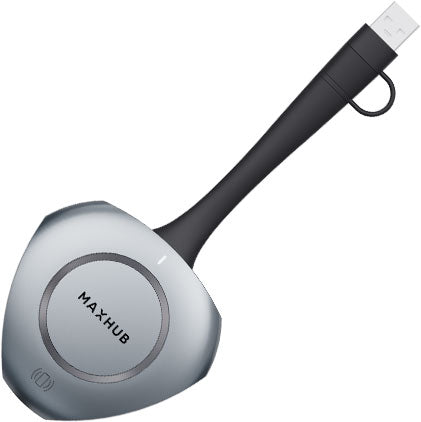
MAXHUB WT13 at a Glance
- Brand
- MAXHUB
- Model
- WT13
- Part Number
- WT13S
- Category
- Video Conferencing Accessories
- Solution
- Video Conferencing
- Supply
- Dubai, Abu Dhabi and across the UAE
- Pricing
- Quoted per project
MAXHUB WT13 Overview
The MAXHUB WT13 is a USB-C wireless screen sharing dongle that pairs with MAXHUB displays and conference devices without installing software or drivers. It mirrors a laptop, phone or tablet in 4K over Wi-Fi 6, and is sold as the WT13S and the WT13M. Supplied by Trianze Tech to customers in Dubai, Abu Dhabi and across the UAE and GCC.
Key Features:
- Plug and play USB-C dongle with a full-featured Type-C DisplayPort interface and USB Type-A adapter compatibility
- 4K screen mirroring, with 77 percent more pixel detail than traditional 1080P hardware encoding, according to MAXHUB
- Wi-Fi 6 wireless transmission for stable, high bitrate audio and video
- Pairs in 5 seconds (MAXHUB laboratory data) with no driver or software installation
- Connects up to 8 wireless screen sharing devices, with up to 4 displayed at the same time
- Mirror, extended display and application screen mirroring modes, with touch back control and pen annotation
- Built-in NFC tag for one-touch sharing from a mobile device
- BYOM (Bring Your Own Meeting) on the WT13M only
Technical Specifications:
| Spec | Value |
|---|---|
| Model | WT13 |
| Brand | MAXHUB |
| Part Number | WT13S, WT13M |
| Product type | Wireless screen sharing dongle |
| Part numbers | WT13S (Wireless screen sharing dongle, without BYOM); WT13M (Wireless screen sharing dongle with BYOM (Bring Your Own Meeting)) |
| Interface | USB Type-C with DisplayPort video output |
| USB Type-A | Compatible with a USB Type-A adapter |
| Screen sharing resolution | 4K |
| Wireless | Wi-Fi 6 |
| Pairing time | 5 seconds (MAXHUB laboratory data) |
| Connected devices | Up to 8 devices connected, 4 displayed simultaneously |
| Projection modes | Mirror display, extended display, application screen mirroring |
| Touch back control and pen annotation | Supported |
| NFC one-touch sharing | Built-in NFC tag |
| Power pass-through | Built-in power supply module |
| BYOM (Bring Your Own Meeting) | WT13M only; WT13S does not support BYOM |
| Computer requirement | USB 2.0 or above, Type-A and Type-C supported |
| Driver or software | Not required |
| Dimensions and weight | Confirmed at order |
| Warranty | Confirmed at order |
Why Buy the MAXHUB WT13 from Trianze Tech?
- Authorized MAXHUB partner with local UAE support
- Help choosing the right model and room setup
- Fast delivery across Dubai, Abu Dhabi, the wider UAE and the GCC
- Pre-sales advice included
Applications & Use Cases
What's Included and Support
Frequently asked
MAXHUB WT13: Frequently Asked Questions
If you don't see your question here, our consultants will gladly walk you through specifics on a discovery call.
Still have questions?
Talk to a consultant. Most queries are answered in a 15-minute call.
The MAXHUB WT13 is a USB-C wireless screen sharing dongle that pairs with MAXHUB displays and conference devices without a driver or software. It mirrors in 4K over Wi-Fi 6 and is available as the WT13S and the WT13M.
Both are the same wireless screen sharing dongle. The WT13M also supports BYOM (Bring Your Own Meeting), which lets you run a meeting from your own computer on a MAXHUB video conference device. The WT13S does not support BYOM.
Up to 8 wireless screen sharing devices can be connected at the same time, and up to 4 can be displayed simultaneously, in mirror, extended display or application screen mirroring modes.
No. The WT13 is plug and play, with no installation or driver. It has a full-featured USB-C interface with DisplayPort video output, and works with USB Type-A computers through an adapter.
The WT13 mirrors in 4K over Wi-Fi 6, which MAXHUB states gives 77 percent more pixel detail than traditional 1080P hardware encoding.
Trianze Tech stocks the MAXHUB WT13 in Dubai with fast delivery across the UAE and GCC. Call +971 58 161 3661 or message us on WhatsApp for the best price and current stock availability.
More from MAXHUB
View all 109 products →-

MAXHUB SL22MC: 21.5 Inch Smart Lectern with Touch Screen, Built-in PC and Electric Height Adjustment
-

MAXHUB V925T: XBoard V7 Series 92 Inch 21:9 5K All-in-One Microsoft Teams Rooms Display with Triple 50MP Camera
-

MAXHUB V865T: XBoard V7 Series 86 Inch 4K All-in-One Microsoft Teams Rooms Display with Triple 50MP Camera
-

MAXHUB V755T: XBoard V7 Series 75 Inch 4K All-in-One Microsoft Teams Rooms Display with Triple 50MP Camera


