


TOA ZP-001T: Digital Zone Paging Module For 9000 Series Mixers

Genuine Products

Original Brand Warranty

Product Training

Installation, Maintenance & Support

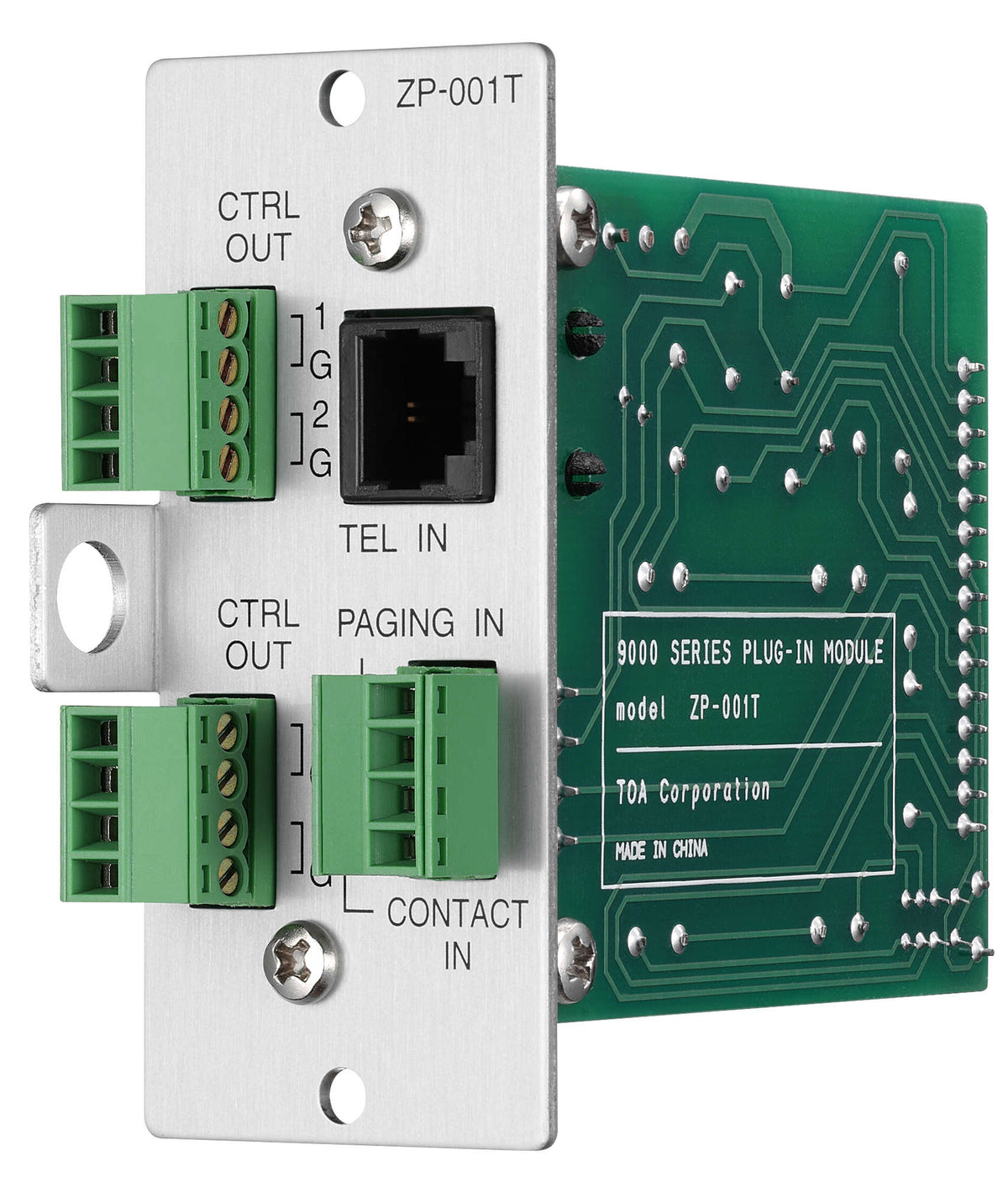
TOA ZP-001T at a Glance
- Brand
- TOA
- Model
- ZP-001T
- SKU
- 67904
- Category
- Audio Interfaces
- Supply
- Dubai, Abu Dhabi and across the UAE
- Pricing
- Quoted per project
Applications & Use Cases
TOA ZP-001T Overview
The ZP-001T is a Zone paging module designed for use with the 9000 Series mixer / amplifiers and functions as interface to connect the 9000 Series mixer / amplifier to an analog PABX, allowing zone paging to be initiated from the PABX. There are two operation modes: ring signal and paging port modes. Supplied by Trianze Tech to projects in Dubai, Abu Dhabi and across the UAE and GCC.
Key Features:
- Broadcast can be initiated regardless of operation mode.
- The TOA ZP-001T is a plug-in zone paging module engineered specifically for the TOA 9000 Series mixer/amplifier platform.
- Power Supply: +24 V DC, +6 V DC
- Current Consumption: 38 mA (at +24 V DC), 18 mA (at +6 V DC)
- Number of Line: 1 line
- Signaling System: Loop-Start (or Ground-Start, selectable)
Technical Specifications:
| Spec | Value |
|---|---|
| Model | ZP-001T |
| Brand | TOA |
| Power Supply | +24 V DC, +6 V DC |
| Current Consumption | 38 mA (at +24 V DC), 18 mA (at +6 V DC) |
| Number of Line | 1 line |
| Type of Selectable Signal | DTMF signal |
| Signaling System | Loop-Start (or Ground-Start, selectable) |
| TEL Line | 0 dB, 600 ohm, balanced, transformer-isolated,; loop voltage: 24 V DC or more, which should be supplied from the PABX.; RJ11 connector |
| Paging Input | 0 dB, 600 ohm, balanced, transformer-isolated audio input,; removable terminal block (4 pins) |
| Control Input | 1 channel, no-voltage make contact, open voltage: 5 V DC,; short-circuit current: 0.5 mA, removable terminal block (4 pins) |
| Control Output | 4 channels, open collector output (isolated), withstand voltage: 35 V DC,; control current: max. 50 mA, removable terminal block (4 pins) |
| Operating Temperature | -10 C to +40 C |
| Finish | Panel: Aluminum, hair-line |
| Dimensions | 35 (W) x 78 (H) x 91.5 (D) mm |
| Weight | 153 g |
| Included Accessories | Removable terminal plug (4 pins) x3, Module mounting screw x2 |
Why Buy the TOA ZP-001T from Trianze Tech?
- Genuine TOA product sourced through authorized channels, with local UAE support
- Pre-sales help designing the paging or audio system around the ZP-001T
- Fast delivery across Dubai, Abu Dhabi, the wider UAE and the GCC
- Installation advice for offices, schools, malls, mosques and public buildings
What's Included and Support
Frequently asked
TOA ZP-001T: Frequently Asked Questions
If you don't see your question here, our consultants will gladly walk you through specifics on a discovery call.
Still have questions?
Talk to a consultant. Most queries are answered in a 15-minute call.
The ZP-001T is a Zone paging module designed for use with the 9000 Series mixer / amplifiers and functions as interface to connect the 9000 Series mixer / amplifier to an analog PABX, allowing zone paging to be initiated from the PABX. There are two operation modes: ring signal and paging port modes.
For the TOA ZP-001T, TOA lists the following. Number of Line: 1 line; Type of Selectable Signal: DTMF signal; Signaling System: Loop-Start (or Ground-Start, selectable); TEL Line: 0 dB, 600 ohm, balanced, transformer-isolated,; loop voltage: 24 V DC or more, which should be supplied from the PABX.; RJ11 connector.
For the TOA ZP-001T, TOA lists the following. Power Supply: +24 V DC, +6 V DC; Current Consumption: 38 mA (at +24 V DC), 18 mA (at +6 V DC).
For the TOA ZP-001T, TOA lists the following. Operating Temperature: -10 C to +40 C; Finish: Panel: Aluminum, hair-line; Dimensions: 35 (W) x 78 (H) x 91.5 (D) mm; Weight: 153 g.
The model is ZP-001T. Quote this model when you call or message Trianze Tech so we match the exact product and version.
Trianze Tech stocks the TOA ZP-001T in Dubai with fast delivery across the UAE and GCC. Call +971 58 161 3661 or message us on WhatsApp for the best price and current stock availability.
Buying guides for this product
Plain language guides from our AV team to help you choose, plan and install.

Buying guide
How to Set Up a Podcast Room: Equipment Checklist for UAE Studios
Read the guide →

Buying guide
Audio Interface vs Mixer vs USB Microphone for Podcasting
Read the guide →
More from TOA
View all 311 products →-

TOA A-9120DHM2CU: 9000M2 Modular Digital Matrix Mixer Amplifier
-

TOA SR-SA3: Line Array Speaker Stand Adapter For SR-H Series
-

TOA SR-H3S: Slim Line Array Speaker For Permanent Install
-

TOA PC-5CL: Clean Room Ceiling Speaker For Controlled Environments


